

 Udemezue John
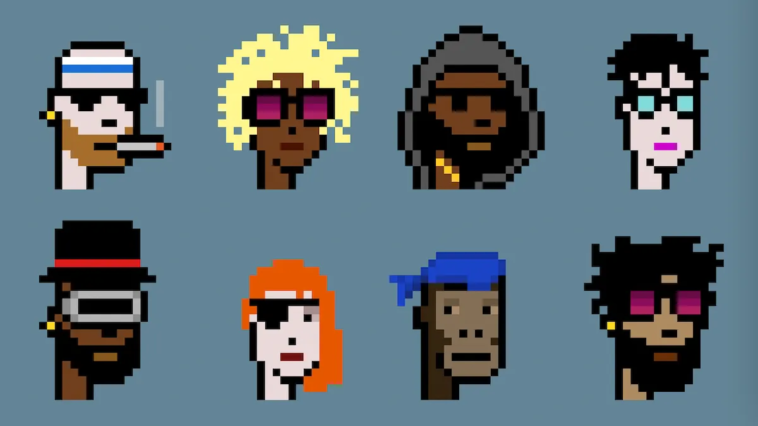
Let me be straight with you. If you own a CryptoPunk, you’re holding something worth anywhere from a small house to a private island. And every single day, people lose these things because they mess up the storage part.
Not because the technology is weak. But because they skip steps, get lazy, or just don’t understand how hardware wallets actually work with NFTs.
Make sure to subscribe to this article
So let’s fix that.
Why Your CryptoPunk Needs More Than Just “Any Hardware Wallet”
Here’s something most guides won’t tell you. Not all hardware wallets handle CryptoPunks the same way. Some older models technically work, but make the process frustrating.
Others leave your Punk visible on your computer screen every time you plug in, which defeats half the security purpose.
You want a hardware wallet that keeps your private keys offline but still lets you see what you own when you want to.
The short version? Ledger and Trezor are your real options here. I’ve used both. Ledger Live now has native NFT support which makes things smoother for CryptoPunks specifically. Trezor works great but you’ll need to connect through MetaMask, which adds an extra step.
For most people, grab a Ledger Nano X or the newer Stax. The Nano S has limited memory and installing the Ethereum app might force you to remove other apps first. Annoying but workable.
What You Need Before Starting
Gather these first. Trust me, hunting for cables mid-process is stressful.
- Your hardware wallet (obviously)
- The recovery phrase written down on paper or metal. Not in a phone note. Never in a screenshot
- A computer with the hardware wallet software installed (Ledger Live or Trezor Suite)
- MetaMask browser extension
- At least 0.02 ETH for gas fees when you move the Punk
That last one gets people. You need ETH in the wallet that currently holds your Punk. Not in the hardware wallet. In the hot wallet or exchange wallet where your Punk sits right now.
Step-by-Step: Moving Your CryptoPunk to Cold Storage
Set Up Your Hardware Wallet First
Don’t skip to the transfer step. Do this right.
Plug in your hardware wallet. Install Ledger Live or Trezor Suite. Create a new wallet and write down that recovery phrase with a pen. No photos. No typing it anywhere. Just paper.
Then install the Ethereum app on your device. Your CryptoPunk lives on Ethereum, so you need that app running.
Connect to MetaMask
Here’s where people get confused.
Open MetaMask. Click your account icon. Go to “Connect Hardware Wallet.” Choose Ledger or Trezor. Follow the prompts.
MetaMask will show you addresses from your hardware wallet. Pick one. That address is now your cold storage. Nothing can move from it without physically pressing buttons on your device.
Important check: Send a tiny amount of ETH to that address first. Like $10 worth. Make sure you can see it in MetaMask and that your hardware wallet asks for confirmation. If that works, you’re ready.
Transfer Your CryptoPunk
Open the wallet or exchange account that currently holds your Punk.
Go to the NFT section. Find your CryptoPunk. Hit send or transfer.
Paste in that hardware wallet address you just set up. Double-check every character. One wrong digit and your Punk is gone forever.
MetaMask will pop up asking for confirmation. Look at the gas fee. If it’s high, wait fifteen minutes and try again. Gas prices change constantly.
Press confirm. Then look at your hardware wallet screen. It will ask you to approve. Press the physical button.
Now wait. This can take anywhere from thirty seconds to ten minutes, depending on network traffic.
Verify It Worked
Go to Etherscan. Paste your hardware wallet address. Look under the “ERC-721 Token Transfers” tab. You should see the CryptoPunk transaction.
Then open OpenSea or any NFT viewer. Connect your hardware wallet (never type your recovery phrase anywhere online). Your Punk should show up.
If you don’t see it immediately, wait an hour. Sometimes indexers are slow.
The Blind Signing Problem Nobody Talks About
Here’s the scary part that most guides leave out.
When you interact with any NFT marketplace or DeFi app using your hardware wallet, you’ll eventually face something called “blind signing.” The screen on your device can’t fully display what the contract does. So you’re approving something without seeing all the details.
This is how people get drained. They sign one innocent-looking transaction and suddenly their Punk is gone.
The fix: Only connect your hardware wallet to sites you deeply trust. Even then, consider keeping a separate hot wallet for regular trading. Move your Punk to hardware storage and then pretty much forget it exists unless you’re selling.
For Ledger users, turn on “Blind Signing” in the Ethereum app settings only when you need it. Then turn it right back off. For Trezor, the same setting exists under “Safety Checks.”
Common Mistakes That Cost People Their Punks
Using a compromised computer
Your hardware wallet protects you even on a virus-filled machine. But if you type your recovery phrase anywhere on that computer, all protection disappears. Never ever type it.
Forgetting the recovery phrase location
I know someone who buried his phrase in a jar. Great security. Then his house flooded and he couldn’t find the jar anywhere. Keep one copy in a safe and another with someone you truly trust.
Losing the device and panicking
If you lose your hardware wallet, buy a new one and restore using your phrase. Your Punks are on the blockchain, not the device. The device is just a key.
Updating firmware at the wrong time
Always update before moving valuable NFTs, not after. Updates are safe but rare glitches happen.
Selling From a Hardware Wallet Later
When you eventually want to sell, you’ll need to connect your hardware wallet to a marketplace like OpenSea or Blur. The process is the same as connecting through MetaMask.
The transaction will ask for hardware confirmation. Press the button. That’s it.
But here’s a pro tip. If you’re selling a high-value Punk, move it to a fresh hot wallet first, then list it. Why? Because connecting your hardware wallet to marketplaces exposes that address publicly. Some people prefer keeping their cold storage address completely private.
Extra step, extra safety.
What About Multiple Punks?
Same process. One address can hold hundreds of Punks. No need for separate wallets.
But if you own multiple high-value Punks, consider splitting them across two hardware wallets.
That way if you somehow mess up one signing session, you don’t lose everything. Paranoid? Maybe. But I’ve watched people lose seven-figure collections from one bad click.
Frequently Asked Questions
Can I store CryptoPunks on a hardware wallet without using MetaMask?
Yes. Ledger Live now shows NFTs directly. You can send Punks to your Ledger address without ever touching MetaMask. But for Trezor users, MetaMask is still the cleanest method.
What happens if my hardware wallet breaks?
Nothing happens to your Punks. Buy a new device, enter your recovery phrase, and everything reappears. The phrase is what matters. The device is replaceable.
Is my Punk safe if I lose the hardware wallet?
Yes, as long as you have the recovery phrase. Whoever finds your lost device can’t access anything without the PIN. After three wrong PIN attempts, the device wipes itself.
Can someone steal my Punk if they get my hardware wallet and know the PIN?
Yes. That’s why your PIN should never be your birthday or something obvious. And never carry your recovery phrase with the device. Keep them separate.
Do I need a different hardware wallet for CryptoPunks versus regular crypto?
No. The same device holds both. Ethereum-based NFTs live alongside your ETH in the same address.
Your Next Move
Hardware wallets aren’t complicated. But they demand patience and attention to detail. Most people rush the setup, skip verifying addresses, or forget where they put their recovery phrase. Don’t be most people.
Take an hour this week. Set it up properly. Move a test NFT first if you’re nervous. Then transfer your Punk.
What’s stopping you from moving your CryptoPunks to cold storage right now? The gas fees? The setup time?
Or just not being sure about the steps? Drop your question below and I’ll walk you through the exact part that feels stuck.

GIPHY App Key not set. Please check settings