

 Udemezue John
If you work remotely and get paid by clients in other countries, you already know the pain. Your bank charges a fee for receiving international wire transfers.
Then they hit you with a terrible exchange rate when you convert dollars to your local currency. By the time the money hits your account, you’ve lost a chunk of it to fees you never even saw coming.
Make sure to subscribe to this article
That’s exactly why Wise exists.
Wise (formerly TransferWise) is a financial platform built specifically for people who work across borders. It’s not a traditional bank.
It’s a smarter way to send, receive, and hold money in multiple currencies without getting ripped off on exchange rates. Over 16 million people now use it, and it moves around €14 billion every single month.
Here’s exactly how it works and why remote workers everywhere are switching to it.
What Is Wise?
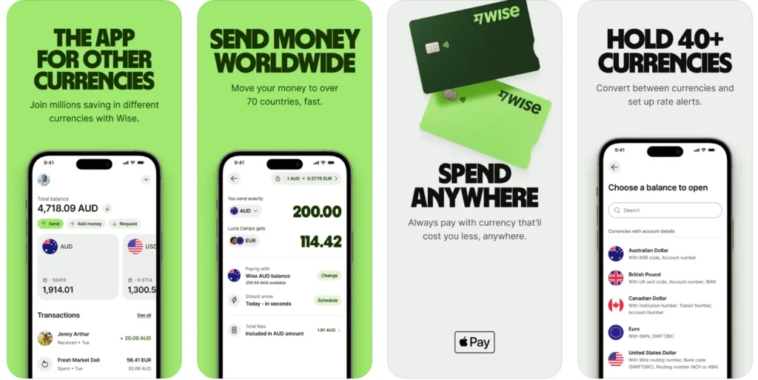
Wise is a digital account that lets you hold money in over 40 different currencies. You get local bank account details in multiple countries—including the US, UK, Europe, Australia, and New Zealand.
That means your American client can pay you like you’re a local US business. Your UK client can pay you like you’re in London.
The platform started in 2011 when two Estonian friends got frustrated with how much banks were charging for international transfers. Their idea was simple: make moving money across borders fair, fast, and transparent.
Today, Wise is one of the most trusted financial tools for freelancers, digital nomads, and remote workers.
How Wise Actually Works
The magic behind Wise is surprisingly simple.
When you send money from one country to another, your money doesn’t actually cross any borders. Here’s what happens instead:
You transfer euros to a Wise account in Germany. At the same time, Wise pays out the dollar amount from its own US account to your recipient in America. The money stays local on both ends. The technology makes it global.
This is why Wise is so much cheaper than banks. Traditional banks use the SWIFT network, which involves multiple intermediary banks, each taking a cut. Wise bypasses all of that.
And the exchange rate? Wise uses the mid-market rate—the same one you see on Google. No markups. No hidden fees. What you see is what you get.
Key Features That Matter for Remote Workers
Local Bank Details in Multiple Currencies
This is the feature that changes everything for remote workers. With Wise, you get local receiving account details in major currencies.
Want to get paid in US dollars? You get a US routing and account number. Your client sends a domestic ACH transfer, which is free for them and fast for you. Want to get paid in euros? You get European IBAN details for SEPA transfers.
This means your clients don’t have to deal with expensive international wire transfers. They pay you like a local vendor. You get paid faster and keep more of your money.
Hold and Convert 40+ Currencies
You can hold money in multiple currencies in one account. This is huge for remote workers who get paid in one currency but live in another.
Instead of converting every payment immediately, you can wait for a favorable exchange rate. If the dollar is weak against your local currency, hold your USD until the rate improves. You’re in control of when to convert.
Wise Debit Card
You get a debit card that works in over 160 countries. When you spend, Wise automatically uses the currency you hold. If you don’t have that currency, it converts at the mid-market rate with a small fee.
No foreign transaction fees. No surprise charges when you buy something online in another currency.
Business Features for Freelancers
If you’re a freelancer or run a small business, Wise Business gives you extra tools. You can create professional invoices, send payment links, and even sync transactions with accounting software like Xero or QuickBooks.
There’s no monthly subscription fee—just a one-time registration fee of around 50 EUR or 45 GBP.
What Does Wise Cost?
Wise is transparent about fees. Unlike banks that hide their profit in the exchange rate, Wise shows you exactly what you’ll pay before you confirm any transaction.
Receiving money: Getting paid via local bank transfer is usually free for most currencies. If someone sends you a SWIFT wire transfer, there’s a small fee—about $6.11 for USD, £2.16 for GBP, or €2.39 for EUR.
Converting currency: Fees vary by currency pair, typically between 0.35% and 2%. For a $5,000 monthly salary, the total cost is usually well under $50 if your client sends via local transfer rather than SWIFT.
Sending money: You’ll see the fee upfront before you confirm. There are no surprise charges.
The key point: Wise doesn’t make money on the exchange rate. They make money on the transparent fee. Banks often charge you a 2-4% hidden markup on the exchange rate. Wise doesn’t do that.
Wise vs PayPal vs Revolut
Wise vs PayPal: PayPal charges higher fees for international transfers and gives you a worse exchange rate. If you’re regularly getting paid in foreign currencies, Wise will save you a significant amount over time.
Wise vs Revolut: Wise is built for cross-border transfers and multi-currency accounts. Revolut is more of an all-in-one financial app with budgeting tools, crypto trading, and stock investing. Both have their place. Many remote workers get paid into Wise and use Revolut for daily spending.
The bottom line: if your main need is receiving international payments and minimizing currency conversion costs, Wise is the better choice.
Is Wise Safe?
Wise is regulated financial institution. They hold your money with established financial institutions and use two-factor authentication to protect your account.
In South Africa, Wise recently received regulatory approval from the Reserve Bank—the first license of its kind on the African continent. This kind of regulatory recognition adds legitimacy and simplifies compliance with local banks.
Wise is not a bank, so your money isn’t covered by deposit insurance schemes like FDIC. But they’re transparent about this, and they’ve built a strong reputation over more than a decade.
Getting Started
Setting up a Wise account takes about 10 minutes. You’ll need to verify your identity with a passport or ID. If you’re opening a business account, you’ll also need some basic business information.
The Wise app is available on both iOS and Android. You can manage everything from your phone—check balances, convert currency, send money, and track payments.
FAQs
Can I use Wise as my main bank account?
Wise isn’t a full bank. It’s great for holding and moving money across currencies, but it doesn’t offer things like savings accounts with high interest or mortgages. Most remote workers use Wise alongside a local bank account.
How long do transfers take?
About 70% of Wise transfers arrive in 20 seconds or less. 95% arrive the same day. It depends on the currencies and payment methods involved.
Can I get paid in USD if I don’t live in the US?
Yes. You get US account details even if you’re based elsewhere. Your client pays you like a local US recipient.
Does Wise work in my country?
Wise is available in most countries, but some features vary by region. Check the Wise website for specific availability in your location.
What’s the difference between Wise Personal and Wise Business?
The personal account is for individual use—travel, sending money to family, personal remote work income. The business account adds invoicing, payment links, multi-user access, and accounting software integration. If you’re a freelancer with business income, you should use a business account.
Final Thoughts
Wise solves a real problem for remote workers. You get paid in foreign currencies. You need to convert that money to your local currency without losing a chunk to fees. You want to hold different currencies and choose when to convert.
The platform delivers on its promise: low fees, real exchange rates, and complete transparency. You always know what you’re paying and why.
Is it perfect? No. It’s not a bank, so you’ll still need one for certain things. But for the specific challenge of managing cross-border income, Wise is hard to beat.
The money you save on fees adds up fast. If you’re getting paid $5,000 a month from international clients, the difference between Wise and a traditional bank could be thousands of dollars a year. That’s real money.
If you’re a remote worker and you’re still using your bank for international payments, you’re leaving money on the table. It’s worth taking 10 minutes to set up a Wise account and see the difference for yourself.
What’s the worst hidden fee you’ve ever been charged by a bank for an international transfer?


GIPHY App Key not set. Please check settings