

 Udemezue John
If you work remotely for clients in other countries, you’ve probably felt the sting of international fees. You send an invoice for $1,000, and by the time it hits your bank account, you’re missing $50 or more. Banks take a cut. PayPal takes a cut. Exchange rates work against you.
There’s a better way. It’s called Wise (formerly TransferWise), and it’s quietly saved remote workers and freelancers millions of dollars in hidden fees.
Make sure to subscribe to this article
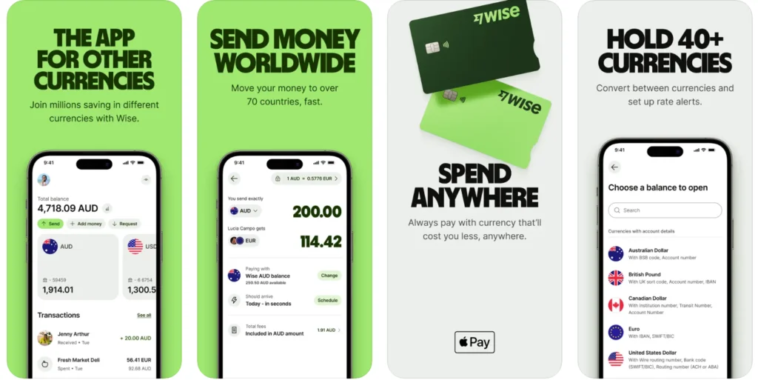
Here’s the short version: Wise lets you hold 40+ currencies, get paid like a local in multiple countries, and convert money at the real exchange rate with zero markup. No banks. No hidden fees. Just straight-up fair pricing.
Let’s break down exactly what Wise is, how it works, and why it’s become essential for anyone earning money across borders.
What Exactly Is Wise?
Wise is a financial technology company built for one purpose: moving money across borders without the ridiculous fees banks charge. It’s not a bank—it’s a digital account that gives you local bank details in multiple countries.
Think of it this way. When you use a bank to send money internationally, they hide their profit in the exchange rate.
They give you a rate that’s 2% to 5% worse than the real market rate, and then they charge you a transfer fee on top. Wise flips that model. They show you the mid-market exchange rate—the same one you see on Google—and charge a small, transparent fee instead.
Over 16 million people and businesses use Wise globally. It’s trusted by freelancers, digital nomads, remote teams, and even major companies like Upwork, who recently partnered with Wise to power faster payments for their global workforce.
How Wise Works for Remote Workers
The magic of Wise comes down to three core features.
You Get Local Bank Details
This is the game-changer. Wise gives you local account details in multiple currencies—USD, GBP, EUR, AUD, and more.
When a client in the US pays you, they send money to a US routing and account number. It looks like a domestic transfer to them. No international wires. No Swift fees. No confusion.
You can give your US clients a US account number, your UK clients a UK sort code and account number, and your European clients an IBAN. They pay you like they’re paying someone in their own country.
You Hold Multiple Currencies
Your Wise account is like a wallet with 40+ compartments. You can hold USD, EUR, GBP, AUD, and dozens of other currencies all in one place. This means you can receive payments in different currencies without converting them immediately. You can wait for the exchange rate to improve before you convert and withdraw.
You Convert at the Real Rate
When you do convert, Wise uses the mid-market exchange rate—no markup. They charge a small fee that varies by currency pair, typically between 0.35% and 2%. You see exactly what you’re paying before you confirm the transaction. No surprises.
Key Benefits for Remote Workers
1. You Keep More of What You Earn
This is the biggest reason remote workers switch to Wise. Banks and PayPal add a markup to exchange rates—usually between 2.5% and 4.5%. On a $5,000 monthly invoice, that’s $125 to $225 lost every single month. Over a year, you’re giving away $1,500 to $2,700 in hidden fees.
With Wise, you pay a transparent fee that’s often under 1%. The savings add up fast.
2. You Get Paid Faster
International bank transfers can take 3 to 5 business days. Wise uses local payment networks—like ACH in the US, Faster Payments in the UK, and SEPA in Europe—so transfers often arrive within 1 to 2 business days. In some cases, payments arrive in seconds.
3. You Have More Control
You decide when to convert your money. If the exchange rate is bad today, hold your USD and wait for a better rate. Wise even lets you set rate alerts so you know when it’s a good time to convert.
4. Your Clients Pay Less
When you give clients local bank details, they don’t pay international wire fees. They send a domestic transfer, which is often free or very cheap. This makes you easier to pay—and clients appreciate that.
5. You Can Spend Directly
Wise offers a debit card that lets you spend money in any currency. If you’re traveling or buying things online in different currencies, the card automatically uses the currency you hold or converts at the real rate. No foreign transaction fees.
Wise Personal vs. Wise Business
If you’re a freelancer or remote worker, you can start with a personal Wise account. It’s free to open and gives you all the core features—local account details, multi-currency holding, and low-cost conversion.
But if you’re running a proper business—even as a sole trader—Wise Business is worth considering. It offers extra features:
- Create and send professional invoices
- Add team members with custom permissions
- Pay up to 1,000 people at once with batch payments
- Connect to accounting tools like QuickBooks and Xero
- Get a business debit card
Important note: Using a personal account for business activities goes against Wise’s terms. If you’re receiving payments for goods or services, you should open a Wise Business account.
Wise vs. PayPal: The Real Difference
Most remote workers start with PayPal because it’s familiar. But the cost difference is substantial.
PayPal adds a markup of 2.5% to 4.5% to the exchange rate. On top of that, they charge receiving fees. Wise uses the mid-market rate with no markup and charges a transparent fee.
For a $1,000 payment from a US client:
- PayPal: You might lose $40 to $60 in fees and exchange rate markup.
- Wise: You might lose $5 to $15.
Wise is also faster for international transfers, with most payments arriving in 1 to 2 business days compared to PayPal’s slower timelines.
PayPal’s advantage is that it’s more widely accepted for online shopping and customer-facing transactions. But for getting paid by clients? Wise is almost always cheaper.
How to Get Started
Opening a Wise account takes about 10 minutes. Here’s what you do:
Step 1: Download the Wise app or go to the Wise website.
Step 2: Sign up with your email and create a password.
Step 3: Verify your identity. You’ll need a photo ID and proof of address. This is a standard requirement for financial services.
Step 4: Once verified, you can unlock local account details for different currencies. Go to your account, select the currency you want, and you’ll see your local account numbers.
Step 5: Share those details with your clients. Put them on your invoices. Tell clients to pay you like a local transfer.
Step 6: When the money arrives, you can hold it, convert it, or withdraw it to your local bank account.
There’s no upfront fee to open a personal account. Wise Business has a one-time setup fee to unlock all features.
FAQs
Is Wise safe?
Yes. Wise is regulated in every country it operates in and holds over 70 financial licenses globally. It’s not a bank, but it’s subject to strict financial regulations.
Can I receive money from clients in any country?
Yes. You can receive payments from over 140 countries. The key is that you give clients local account details for the currency you want to receive.
How long does it take to receive money?
It depends on how the client sends it. If they use the local account details you provide, it’s typically 1 to 2 business days. Some transfers arrive within seconds.
What are the fees?
Wise charges a transparent fee that varies by currency pair, typically between 0.35% and 2%. Receiving funds via local bank transfer is free for most currencies. You see the exact fee before you confirm any transaction.
Can I use Wise if I don’t have a business?
Yes. The personal account is perfect for freelancers and remote workers who receive international payments. Just make sure you’re not using it for commercial business activities if you’re on a personal plan.
Final Thoughts
Wise solves a problem that every remote worker faces: getting paid fairly. Banks and PayPal take too much. International wires are too slow. Exchange rates are too confusing.
Wise strips all that away. You get local account details. You hold multiple currencies. You convert at the real rate. You keep more of what you earn.
It’s not going to make you rich overnight. But it will stop you from giving away hundreds or thousands of dollars in hidden fees every year. For remote workers, that’s real money.
The best time to switch was yesterday. The second best time is now. Open an account, give your clients local details, and start keeping what you actually earned.
What’s the worst hidden fee you’ve ever paid just to receive money from a client?
Get started now – Wise



GIPHY App Key not set. Please check settings