

 Udemezue John
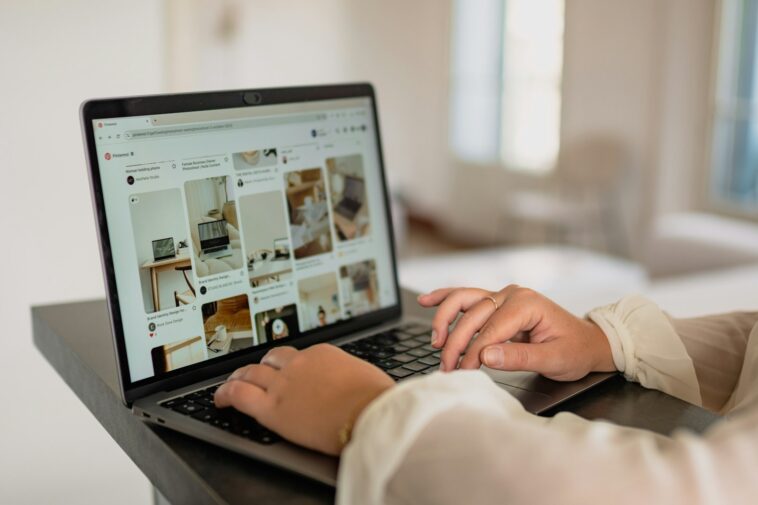
Let’s be real. Most advice on promoting affiliate offers feels the same: grind on social media, fight the algorithm, and watch your content disappear in 24 hours.
Or, you’re told to build a whole blog first—which is a fantastic long-term play, but what if you want to generate clicks and commissions now, without waiting six months for Google to notice you?
That’s the exact frustration that led me to pivot a portion of my strategy years ago. I was tired of the ephemeral nature of other platforms for certain offers.
I needed a place where content had a longer shelf life, where users were actively looking for ideas and solutions, not just passively scrolling.
The answer, which I’ve honed over the last six years building multiple online income streams, was Pinterest.
Pinterest isn’t social media in the traditional sense. It’s a visual discovery engine. People go there to plan, to solve problems, to find their next project, and to get inspired.
That intent is pure gold for CPA (Cost Per Action) and ClickBank offers, which often cater to specific desires—losing weight, making money, learning a skill, improving a home.
This guide isn’t about a “get-rich-quick pin.” It’s a practical, sustainable method to build a traffic funnel that works while you sleep.
Why This Works: The Pinterest Mindset
Before we dive into the “how,” understand the “why.” On Pinterest, a pin is an entry point to an idea. A user searching for “low-impact workouts for beginners” isn’t just killing time.
They have intent. They are a perfect candidate for a CPA offer for a fitness app trial or a ClickBank product about joint-friendly exercise.
Your job isn’t to sell to them on Pinterest. Your job is to create a pin that captures that intent and leads them to a simple, valuable page where the offer makes sense.
Pinterest rewards helpful, high-quality, visually appealing content that keeps users engaged on the platform and inspires them to act. We align with that.
Your Step-by-Step Playbook
This is the same framework I use and teach. It’s simple, but execution is key.
Step 1: Lay the Unsexy Foundation
First, you need a Pinterest Business Account. It’s free and gives you access to analytics and ads tools. Convert your personal account or start fresh. I often start fresh for a specific niche to keep things focused.
Next, claim your website. This is a non-negotiable step in Pinterest’s backend that ties your profile to your landing page or site, building authority.
Finally, optimize your profile:
Profile Name: Include a primary keyword. “Jane Doe | Home Workout Ideas” is better than just “Jane Doe.”
Bio: Clearly state what value you provide. “Sharing simple fitness tips and proven resources for beginners.” No hype, just clarity.
Profile Picture: A clear, friendly headshot builds trust.
Step 2: The Offer & Content Matchmaker
You cannot promote any random offer. The pairing is everything.
For ClickBank: Look for offers with high gravity, but also with a visual appeal. Think “kitchen gadgets,” “yoga programs,” “skincare routines,” “crafting tutorials.” The product must be something people would want to see or imagine the result of.
For CPA: Focus on offers with a clear, desirable outcome. “Get your credit score,” “try this meal kit,” “sample this skincare.” The action should solve a common, searchable problem.
Now, create a simple landing page. This is critical. Do not send Pinterest traffic directly to the vendor’s sales page. It breaks the user experience and often violates terms. Your landing page can be:
A simple blog post reviewing or introducing the solution.
A straightforward “resource” page with your personal recommendation.
An email opt-in page where the freebie relates to the offer (e.g., “Get a 3-Day Home Workout Plan” that leads to a workout program offer).
This page is where you build trust and transition the click into a conversion.
Step 3: Design Pins That Don’t Look Like Ads
This is where most fail. Your pins must blend in and attract.
Templates: Use Canva. Create 2-3 consistent, on-brand templates for your niche. Use clear, readable fonts.
Imagery: High-quality, authentic-looking photos or graphics. Avoid the cheesy, over-the-top stock photos you see in bad ads. Pinterest favors real, relatable, and aspirational imagery.
Text Overlay: Include a clear, benefit-driven headline. “3 Tools That Saved My Morning Routine” not “Buy This Now!”
Format: Use vertical pins (2:3 ratio is ideal, like 1000x1500px). Pinterest loves video pins (looping videos, ideas tutorials) and Idea Pins (now called “Story Pins”). These formats get higher native reach.
Step 4: The Strategic Pin & Keyword System
Each pin is a small piece of SEO.
Title (First 30 characters are vital): Make it keyword-rich and compelling. “Easy Meal Prep Recipes for Busy Weeks.”
Description: Write a full, helpful 1-2 sentence description naturally incorporating keywords. Tell the story of what they’ll find on your landing page. “If you’re struggling to find time to cook healthy meals, these 5 meal prep recipes changed my week. I’ve included my favorite tools to make it even faster.” Then, include relevant hashtags (3-5 is plenty).
Link: Always link directly to your relevant landing page.
Board Strategy: Create specific boards based on keywords. “Quick Healthy Recipes,” “Kitchen Organization,” “Meal Planning Tips.” Pin your content to the most relevant board first, then save that pin to 2-3 other relevant boards over the next few days. This helps distribution.
Step 5: Consistency & Analytics Over Hype
Your first 10 pins won’t blow up. This is a momentum game.
Schedule: Use Pinterest’s free native scheduler or a tool like Tailwind. Start by scheduling 3-5 fresh pins per day, spread out. You can create variations of the same core idea (different images, slightly different titles) for one offer.
Engage (a little): Spend 10 minutes a day freshening up your home feed by searching your keywords and saving a few relevant pins from others. This tells Pinterest your account is active in your niche.
Analyze: After 30 days, check your analytics. See which pins have the highest link clicks or impressions. Double down on what works. Stop what doesn’t.
FAQs
Do I need a huge following?
No. Zero. Pinterest traffic is primarily driven by search and the smart feed, not followers. Focus on keyword optimization and great visuals.
How soon will I see traffic?
You might see trickles in a week, but meaningful, steady traffic usually builds over 2-3 months. A pin can go “viral” and drive traffic months or even years later. It’s an evergreen asset.
Can I use this for any niche?
Most, but not all. Visually-driven niches (home, fitness, craft, finance tips, software tutorials) excel. Highly technical B2B offers are a harder sell.
Should I use Pinterest Ads?
Once you have a pin that’s organically getting good click-through rates, you can boost it with a small daily budget. This is a powerful way to scale a winner. But start organic.
The Long-Game Perspective
Using Pinterest for affiliate offers isn’t a viral hack. It’s a methodical system for building a portfolio of visual assets that work as 24/7 traffic drivers. It complements SEO and other marketing efforts beautifully.
The biggest shift is moving from a pushy “promoter” mindset to a helpful “publisher” mindset. You’re publishing useful ideas on Pinterest that naturally lead to solutions you’ve vetted.
This approach has allowed me to build sustainable income streams that aren’t at the mercy of a single algorithm change. It’s quiet, consistent, and incredibly powerful.
So, the question isn’t whether Pinterest is right for your offers. The real question is: What problem are your offers solving, and how can you create a pin that visually captures the desire for that solution?

GIPHY App Key not set. Please check settings